Model-View-Controller
Retired Document Important: This document may not represent best practices for current development. Links to downloads and other resources may no longer be valid. Model-View-Controller The Model-View-Controller (MVC) design pattern assigns objects in an ap
developer.apple.com
Model-View-Controller
Model-View-Controller The Model-View-Controller design pattern (MVC) is quite old. Variations of it have been around at least since the early days of Smalltalk. It is a high-level pattern in that it concerns itself with the global architecture of an applic
developer.apple.com

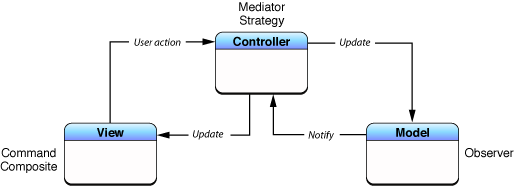
- UI와 비즈니스 로직을 분리하기 위한 아키텍처 패턴
- UIKit 자체가 MVC 기반으로 설계되어 있음
Model ← Controller → View

Controller(UIViewController)가 View와 Model을 모두 관리
각 계층의 역할
Model
- 데이터와 비즈니스 로직 담당
- View, Controller의 존재를 모름
- 데이터가 어떻게 보여질지 관심 없음
struct Waiting {
    let id: Int
    let customerName: String
    let partySize: Int
    let status: WaitingStatus
}
View
- 화면에 데이터를 표시하는 역할
- 사용자 입력을 받아 ViewController에 전달
- 비즈니스 로직을 포함하지 않음
- UIView, XIB, StoryBoard 등
// iOS에서 View는 UIView 자체
class WaitingCell: UITableViewCell {
    @IBOutlet weak var nameLabel: UILabel!
    @IBOutlet weak var statusLabel: UILabel!

    func configure(name: String, status: String) {
        nameLabel.text = name
        statusLabel.text = status
    }
}
Controller
- Model과 View를 연결하는 중간 역할
- 사용자 입력을 받아 Model을 업데이트
- Model의 변경을 View에 반영
class WaitingListViewController: UIViewController {
    var waitings: [Waiting] = []

    override func viewDidLoad() {
        super.viewDidLoad()
        fetchWaitings()
    }

    func fetchWaitings() {
        // Model 업데이트
        // View 갱신
    }
}
동작 흐름
사용자 입력
    ↓
Controller (사용자 액션 처리)
    ↓
Model (데이터 변경)
    ↓
Controller (변경 감지)
    ↓
View (화면 업데이트)
장점
- 단순함: 구조가 간단해서 작은 앱에서는 빠르게 개발 가능
- 러닝커브 낮음
단점
- Massive ViewController
- UIViewController가 View의 생명주기(viewDidLoad, viewWillAppear 등)까지 관리하기 때문에 Controller와 View를 사실상 분리할 수 없다.
// 현실의 ViewController — 모든 게 여기 몰림
class WaitingListViewController: UIViewController,
    UITableViewDataSource,   // 테이블뷰 데이터
    UITableViewDelegate,     // 테이블뷰 이벤트
    UISearchBarDelegate {    // 검색 이벤트

    // UI
    @IBOutlet weak var tableView: UITableView!

    // 데이터
    var waitings: [Waiting] = []

    // 생명주기
    override func viewDidLoad() { ... }
    override func viewWillAppear() { ... }

    // 네트워킹
    func fetchWaitings() {
        URLSession.shared.dataTask(with: url) { data, _, _ in
            // JSON 파싱
            // 데이터 가공
            // UI 업데이트
            // 에러 처리
        }.resume()
    }

    // TableView DataSource
    func tableView(_ tableView: UITableView, numberOfRowsInSection section: Int) -> Int { ... }
    func tableView(_ tableView: UITableView, cellForRowAt indexPath: IndexPath) -> UITableViewCell { ... }

    // TableView Delegate
    func tableView(_ tableView: UITableView, didSelectRowAt indexPath: IndexPath) { ... }

    // 화면 전환
    func navigateToDetail() { ... }
}
// → 수백 ~ 수천 줄짜리 ViewController 탄생
- 테스트 어려움
- ViewController를 테스트하려면 View를 띄워야 함 → 단독 테스트 사실상 불가
// ❌ ViewController 테스트가 어려운 이유
func test_대기목록_로드() {
    let vc = WaitingListViewController()
    vc.loadViewIfNeeded()  // View를 강제로 로드해야 함
    vc.fetchWaitings()
    // 네트워크 요청이 실제로 나가버림...
    // UI와 로직이 섞여있어서 로직만 테스트할 수 없음
}
- 재사용성 낮음: ViewController에 로직이 결합되어 있어 재사용이 어려움
- 유지보수 어려움: 한 파일에 모든게 있어서 변경 시 사이드 이펙트 발생 가능
'Architecture' 카테고리의 다른 글
| [Architecture] MVI (0) | 2026.02.19 |
|---|---|
| [Architecture] 클린아키텍쳐 (0) | 2026.02.18 |
| [Architecture] MVVM 패턴 (0) | 2024.02.17 |
| [CS] 객체지향 프로그래밍(OOP)이란? (0) | 2024.02.12 |


